


Pictonico!
4.0224.00 Reviews
App Specs
- Version
- 1.0.0
- Updated On
- License
- Free
- Downloads
- 1,000,000+
- Developer
- Nintendo Co., Ltd.
- Categories
- Arcade
- Platform
- Android
Screenshots




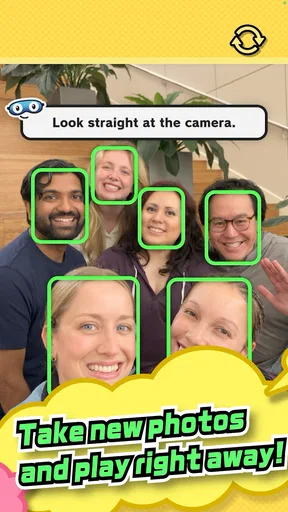



 Analysis by AppCompare
I approached Pictonico expecting a photo tool, but it is an arcade game from Nintendo Co., Ltd. built around turning pictures into playful challenges. That distinction matters: I would choose it for a light, shared laugh rather than for editing or organizing a photo collection. The central appeal is personal material becoming part of the play, which gives the idea a different feel from a conventional arcade game.
What the purchase context tells me
The game is free to install, is rated Everyone, and has in-app purchases listed from $5.99 to $7.99 per item. Those facts are enough to frame the spending question without pretending to know what each purchase contains. I’d start with the free experience and decide whether it is enjoyable before spending anything. The price range is worth noticing, especially if you are handing a device to a child, but it does not tell me whether a purchase is necessary to enjoy the core game.
At the time of this review, Pictonico is at version 1.0.0, with a May 19, 2026 release date and a minimum OS requirement of 8.0. Its audience signals are modest but established: an average rating of 4.0 from around 2.6 thousand ratings, 223 written reviews, and over one million installs. I treat those figures as context, not as proof that it will suit every group. For a first session, I’d focus on whether the photo-based play feels comfortable and funny to the people actually holding the phone.
Why personal photos change an arcade session
The photo hook gives the game a social use that a typical score-chasing arcade title does not have. A familiar picture can make a short challenge feel tailored to the people in the room, so I can see this working during a family visit, a casual get-together, or a quiet evening when everyone wants something brief rather than a long game. It is best approached as shared entertainment: the picture itself supplies the personal connection, while the minigame supplies a quick reason to react and laugh.
That same strength calls for a little care. Before using a photo, I’d choose one that everyone pictured is comfortable turning into a joke or game prompt. A silly group snapshot may be perfect among close friends, while a private or sensitive image is a poor choice even if the app makes it easy to use photos. The best practical habit is to agree on the picture first and keep the session focused on images the group is happy to share in that setting.
Progress without turning it into pressure
I would not approach Pictonico expecting the kind of long-term progression associated with a sprawling arcade campaign. Its stated premise points toward a collection of short minigames, so the sensible way to judge it is by how enjoyable a few rounds are, not by how many hours it can occupy. That makes it a more natural fit for a spare moment than for someone seeking a deep solo challenge, a demanding skill ladder, or a game built around extended play sessions.
For an everyday test, imagine friends waiting for food or family members sharing a living room after dinner. I’d bring out one suitable photo, try a short round, and stop while the joke still feels fresh. That approach makes the photo feel like an invitation rather than a commitment, and it avoids turning a casual gathering into a competition over who has played longest. If people want a more serious contest, a traditional arcade game with clearly visible score-chasing is likely the better choice.
Worth Reading Before You Choose

EA SPORTS FC Mobile 26 Is a Bigger Football Game, but It Takes Time

Flipboard Shows What News Apps Must Do Beyond the Feed

Switching to Android Auto Means Rethinking Your Driving Routine

Google Calendar Makes a Crowded Week Easier to Manage

Ludo King Makes the Most of the Minutes Between Plans

Baby Panda World Brings Quick Play to Modern Phones, but Its Game Library Feels Busy
Fair spending and the limits of what I can judge
The listed purchase range is the only confirmed detail I can use to discuss costs. I can’t responsibly say whether those items unlock particular content, provide an advantage, or are purely optional extras, so I would not buy anything on the assumption that it improves the experience. My practical recommendation is simple: try the available play first, check the purchase screen carefully if you decide to continue, and make sure the person paying understands the displayed price before confirming.
The same restraint applies to competitive fairness. There is no confirmed information here about rankings, multiplayer rules, or paid advantages, so I would avoid treating Pictonico as a competitive game where spending determines who wins. For a casual group, the more useful question is whether everyone gets an enjoyable turn and feels fine about the photos being used. If your priority is a balanced head-to-head contest with transparent rules, choose an arcade title designed around that kind of competition instead.
How Pictonico Fits Into a Photo-and-Arcade Mix
Compared with familiar alternatives, Pictonico occupies an unusual middle ground. A photo editor is for changing an image; a camera app is for taking one; and a standard arcade game usually keeps its play separate from your personal snapshots. Pictonico’s appeal is the connection between a picture and a quick game. I would not replace an editor or a camera tool with it, and I would not expect it to offer the depth of a dedicated arcade favorite. I’d choose it when the point is to make a personal photo part of a playful moment.
It will suit people who enjoy spontaneous group humor and do not need a lengthy campaign to feel entertained. It is less suitable for anyone who prefers private, solo play, wants precise control over photo editing, or is uncomfortable using personal images in a game. Those are not small distinctions: the photo premise is the reason to try it, but it is also the reason some players will prefer a conventional arcade game that does not involve their camera roll.
Making a first session work well
I’d keep the first try deliberately simple. Pick an image that is already harmless and funny, make sure the people present are comfortable with it, and treat the first round as a test of the group’s mood. If the room is lively, a photo-based game can give everyone a shared reference point. If people are tired or would rather scroll quietly, the same setup may feel like extra effort, and there is no reason to force the activity.
Another useful trade-off is that personal photos can make a game feel more memorable, but they also put more emphasis on judgment than an ordinary arcade title does. A neutral, lighthearted picture is a safer starting point than an image that could embarrass someone later. I’d also avoid making the game the default choice for every gathering; keeping it occasional can help the photo jokes stay fresh instead of turning a familiar album into repetitive material.
What to check before spending or sharing
Two reasonable questions are whether the game can be enjoyed without paying and exactly what an optional purchase offers. The free price means there is no upfront cost to install, but the listed in-app purchases mean I would still review each offer rather than assume everything is included. Since the specific contents of those items are not established here, I’d make the decision from the purchase screen itself and only pay if the offer is clear and useful to you.
A separate question is what happens to photos after they are used. I would not make promises about storage, sharing, or privacy without confirmed details, so anyone cautious about personal images should check the game’s current privacy information and device prompts before selecting a picture. If that feels like more uncertainty than you want for a casual game, you can simply choose an arcade alternative that uses built-in artwork instead of personal photos.
My trust verdict
My overall view is cautiously positive, with a clear caveat: Pictonico is appealing when its photo-based humor matches the people playing, not because it replaces a camera, editor, or more substantial arcade game. Nintendo Co., Ltd. is the developer, and the game’s Everyone rating makes its stated age classification broad, but I would still use sensible judgment about which images are appropriate in a family setting. The rating does not remove the need to think about consent or embarrassment when a real person’s picture is involved.
I’d recommend giving the free game a try if you want a light activity to share and are comfortable choosing suitable photos. I would skip it if you want detailed editing, a private photo library, or a competitive arcade experience whose rules and spending advantages are easy to assess. The listed price range is something to keep in mind, while the exact value of each purchase remains a decision to make only after checking what is offered. For the right group, a brief session could make a familiar picture fun in a new way; for everyone else, a more conventional arcade game is the safer fit.
Capturing Moments with Ease
One of the first things you'll notice when you open Pictonico is its user-friendly interface. The developers have done a stellar job in making sure everything feels intuitive. You don’t need to be a tech whiz to navigate through the features. It’s like the app reads your mind, anticipating your needs before you even realize them.
The camera functionality is nifty, with a range of filters and effects that can be applied in real-time. Want to give your photo a vintage look? No problem. Looking for something more vibrant? It's got you covered. The app makes it super easy to experiment with different styles without feeling overwhelmed by options.
Editing Like a Pro
Now, onto editing. If you’ve ever struggled with complex photo editing software, you’ll be thrilled with what Pictonico offers. The editing tools are powerful yet uncomplicated. You can crop, adjust brightness, contrast, and even add text or stickers to personalize your snaps. Everything is laid out in a way that makes sense, so you spend less time figuring things out and more time creating.
What really stands out is the AI-powered enhancement feature. A single tap can dramatically improve your photos, making them look professionally polished. It's almost like magic, and you’ll find yourself using it more often than you’d expect.
Sharing and Connecting
Sharing your creations is a breeze with Pictonico. The app connects seamlessly with your favorite social media platforms, allowing you to post directly to Instagram, Facebook, or wherever your heart desires. You can also send photos directly to friends and family through messaging apps, making it super convenient to spread the love.
For those of us who enjoy a bit of community interaction, the app’s social feature is a fantastic addition. You can explore a feed of photos shared by other users, gain inspiration, and even pick up a few tips and tricks along the way. It’s a vibrant community that makes the app feel like more than just a photo tool.
Keeping Your Memories Safe
Pictonico excels in ensuring your memories are safe and sound. With cloud backup options, you can rest easy knowing your photos are securely stored and accessible whenever you need them. This is a game-changer for anyone who’s ever had the nightmare of losing precious photos due to a device mishap.
Additionally, the app’s organizational features are a lifesaver. You can create albums, tag photos, and easily search for specific moments. It’s like having a digital photo album at your fingertips, always ready to take you down memory lane.
Final Thoughts
All in all, Pictonico is a solid choice for anyone who loves capturing and sharing life’s moments. The combination of ease of use, powerful editing tools, and seamless sharing capabilities makes it a standout in the crowded world of photo apps. Whether you’re a casual snapper or an avid photographer, this app is sure to enhance your photo-sharing experience.
So, if you haven’t already, give Pictonico a try. Download it, play around with the features, and watch as your photo game reaches new heights. Trust me, you won’t be disappointed!
Pros
- User-friendly interface promotes easy navigation.
- Wide variety of photo editing tools.
- High-quality output with minimal effort.
- Seamless integration with social media.
- Frequent updates improve app functionality.
Cons
- Occasional ads can interrupt editing flow.
- Some features require in-app purchases.
- May consume significant device storage.
- Not all filters are customizable.
- Requires internet for certain features.
FAQs for Pictonico!
What is Pictonico and how does it work?
Pictonico is a photo editing app designed for both Android and iOS platforms. It offers a range of tools to enhance, filter, and transform your images with ease. The app provides intuitive features like one-touch adjustments, customizable filters, and creative overlays, making it suitable for both amateur and professional photographers.
Is Pictonico free to use, or does it have any in-app purchases?
Pictonico is available as a free download, offering essential editing tools at no cost. However, it also includes premium features and advanced filters available through in-app purchases. Users can opt for a subscription model to unlock all features, providing a more comprehensive editing experience.
What are the system requirements for installing Pictonico?
To install Pictonico, Android users need a device running version 5.0 or higher. For iOS users, the app requires iOS 11.0 or later. Ensure that your device has sufficient storage space and is connected to a stable internet connection for a smooth download and installation process.
How does Pictonico ensure user privacy and data security?
Pictonico takes user privacy seriously, implementing robust security measures to protect personal data. The app does not store photos on its servers, and all edits are performed locally on the device. Users are encouraged to review Pictonico’s privacy policy to understand their data handling practices.
Can I share edited photos directly from Pictonico?
Yes, Pictonico allows users to share their edited photos directly to social media platforms like Instagram, Facebook, and Twitter. The app integrates seamlessly with these platforms, providing quick sharing options. Users can also save their creations to their device's gallery for future use.


